The Pipedrive Pipeline View, Explained Without the Fluff
The pipedrive pipeline view is the screen where your whole sales day suddenly makes sense. Every open deal becomes a card. Every stage of your process becomes a column. You drag a card to the right as the deal moves along, and just like that, you can see where your money is stuck.
Here is the thing, though. Most people open it, nod, and never touch a single setting. Shame. Set up well, this one screen tells you who to call first, which deals are about to go cold, and how much revenue is genuinely in play this month. Set up badly, it is a nicer-looking to-do list and not much else.

What the Pipedrive pipeline view actually shows you
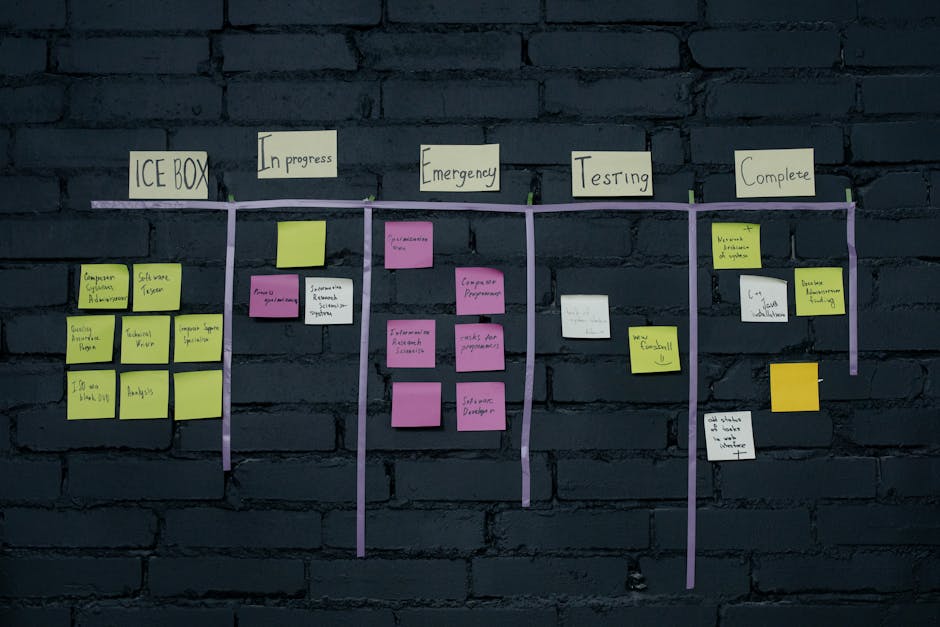
Picture a whiteboard covered in sticky notes. The pipedrive pipeline view is basically that, except the notes update themselves. Deals are the cards. Stages are the columns. You move a deal left to right by dragging its card, and Pipedrive quietly tracks the value, the owner, and the expected close date in the background.
By default each card shows the deal title, the contact, the value, a label, and who owns it. That is enough to scan a whole board in a few seconds and know roughly where you stand. No spreadsheet. No digging through a week of email threads.
The point is visibility, plain and simple. Instead of guessing how the quarter is going, you glance at one screen and you know. Deals piling up in an early stage? That is a prospecting problem. Deals stalling in Negotiations Started? That is a closing problem. The board does not flatter you, and that is exactly why it is useful.
While you are here, how do your reviews compare?
Type your business name and see where you rank against your competitors. Free, no signup.
Trophy Jar asks every customer for a review automatically, from $9 a month.Start now
Setting up your Pipedrive pipeline view stages
Pipedrive ships with five default stages: Qualified, Contact Made, Demo Scheduled, Proposal Made, and Negotiations Started. A perfectly fine starting point. Also completely generic. Your business is not generic.
So rename them to match how you actually sell. A contractor might run Site Visit, Quote Sent, Follow-up, and Won. A software team might keep the demo stages but bolt on a Trial or Security Review column. My rule of thumb: each stage should be a real step a deal has to clear, something you can objectively tick off. If you cannot say for certain whether a deal has passed a stage, the stage is too vague and it needs to go.
You can also run more than one pipeline. Keep new business separate from renewals, or split things out by product line. Each one gets its own pipedrive pipeline view, so the numbers stay honest and you are never mixing a $500 renewal in with a $50,000 new logo.
And keep the number of stages tight. Four to seven is the sweet spot. Go past that and the board turns into a horizontal scroll you eventually stop reading.
Reading the color cues and deal rotting alerts
This is where the pipedrive pipeline view really earns its keep. It is not a static snapshot. It nudges you.
Deals are ordered by their next activity, so anything overdue or due today floats to the top of its column. The stuff that needs you right now is impossible to miss. Deals with nothing scheduled sink to the bottom, quietly reminding you that you dropped the ball on somebody.
Then there is deal rotting, which is the feature I wish more people used. You set a limit, say seven days, and any deal that sits untouched past that starts flagging a colored warning. Red tile on a card means a deal is quietly going cold while you were busy chasing something shinier. Those color cues are honestly the single best reason to open the board every morning. They turn a passive list into an early warning system.
Sort by value when you want to zero in on the big fish. Filter by owner when you are running a team and need to see one rep’s board. Ask a different question tomorrow and the pipedrive pipeline view answers that one instead.
Common mistakes that make the board useless
The pipedrive pipeline view only works if the data under it is real. And a few sloppy habits quietly break it.
Number one is the graveyard stage. Deals that will never, ever close but nobody has the heart to mark as lost. They pile up, they inflate your forecast, they make the whole board lie to you. Be ruthless here. Mark them lost, move on. A clean board is an honest board.
- Stages that describe your feelings, not the facts. “Hot lead” is a mood. “Proposal sent” is a fact. Use facts.
- No next activity on a deal. A card with no scheduled follow-up has basically fallen out of your pipeline already. Every open deal needs a next step, full stop.
- Too many pipelines. One or two you actually maintain will always beat six you ignore.
Treat the board as your source of truth and it becomes one. Half-update it and it becomes a very pretty piece of fiction. If you are shopping around, plenty of review management software and CRM tools promise clean pipelines out of the box, but the discipline is on you, not the tool. Always is.
What the Pipedrive pipeline view can’t tell you
Now the honest limit. The pipedrive pipeline view is brilliant at showing you deals in motion. It goes quiet the moment a deal is marked Won.
That card slides off the board and vanishes from your active view. Job done, right? Except the customer relationship is only just getting started, and the single most valuable thing that customer can do for you next happens nowhere near your pipeline. It is leaving a public review that helps you close the next ten deals.
Your CRM tracks the sale. It does not capture the proof. And proof is what turns a stranger poking around your website into someone who trusts you enough to fill out the form and land in your pipeline in the first place.
Reviews increasingly shape which businesses buyers and search engines trust. For context, see Google’s guidelines on reviews.
How reviews feed the top of your pipeline
Buyers do their homework long before they ever become a card on your board. They read reviews. They check your star rating. They look for real people willing to vouch for you. Social proof is what closes the deal before the deal even starts. A prospect who shows up already trusting you moves through your stages faster and haggles a lot less. That is the quiet math behind every 5-star review: it warms up the next lead so your Pipedrive board fills with people who are half-sold before you say a word.
The catch? Collecting reviews by hand never survives a busy week. You mean to ask. You forget. The happiest customer you had all month says nothing, because nobody prompted them at the right moment.
Trophy Jar fixes that. It plugs into the tools you already run and fires off a review request the second a trigger hits, like a deal marked won or an invoice getting paid. The 5-star ones get pushed out to Google and your website where the next buyer will actually see them. The critical ones ping you privately before they ever go public. Think of it as the trust engine feeding the top of your funnel, running on autopilot while you work the board.
Frequently Asked Questions
Can I have more than one pipeline in the Pipedrive pipeline view?
Yes. You can create multiple pipelines and switch between them, each with its own stages and its own board. A common setup is one pipeline for new business and a separate one for renewals, so the numbers never get tangled and your forecast stays honest.
How do the color warnings on deal cards work?
They come from the deal rotting setting. You choose how many idle days a deal can sit in a stage, and once a card passes that limit it turns a warning color, usually red. It is a fast way to spot deals going cold before you lose them, which is exactly why checking the board daily pays off.
What happens to a deal after I mark it Won?
It leaves the active pipeline view so your board stays focused on live deals. You can still find it later by filtering for won deals. It is also the perfect moment to ask that happy customer for a review, which is one thing the pipeline itself will never do for you. A tool like Trophy Jar can automate that request the instant a deal closes.
The bottom line on pipedrive pipeline view
If there is one thing to take away about pipedrive pipeline view, it is that consistency wins. The businesses that get the most out of pipedrive pipeline view make it a steady habit, not a one-off push.
Related reading
Keep going: see collect video testimonials.
Your won deals should be earning you reviews
Every deal that slides off your Pipedrive board is a review waiting to happen. Let Trophy Jar ask automatically the moment a deal closes, so the next buyer shows up already trusting you. Start for $9/month.